Keep Your Tills Trading This Black Friday
Keep Your Tills Trading This Black Friday
How Arch Retail’s Safe Mode helps tills continue trading during server or network interruptions.
Black Friday is not the time for transactions to stop at your tills. Arch Retail has a solution to help keep your retail operations running even if your network is down. Safe Mode helps your POS continue processing sales while the communication with the network or server is restored.
Peak trading needs a POS system built for continuity.
Black Friday leaves little room for till downtime. With higher checkout pressure and customers expecting quick service, a server or network interruption can quickly become an operational problem.
Arch Retail's Safe Mode is designed for these moments
What is Arch Retail’s Safe Mode?
Safe Mode is designed to support trading continuity when a Point of Sale cannot communicate with the server. The till can use locally available Safe Mode information so the cashier can continue processing sales while the connection problem is investigated.
Because the till is working from information already available locally, preparation matters. Product, pricing and promotional information should be updated before peak trading begins.
For retailers, the benefit is simple: a lost connection does not have to mean lost sales.
Learn more about Arch Retail’s integrated in-store retail management solution.
How Safe Mode supports your retail store
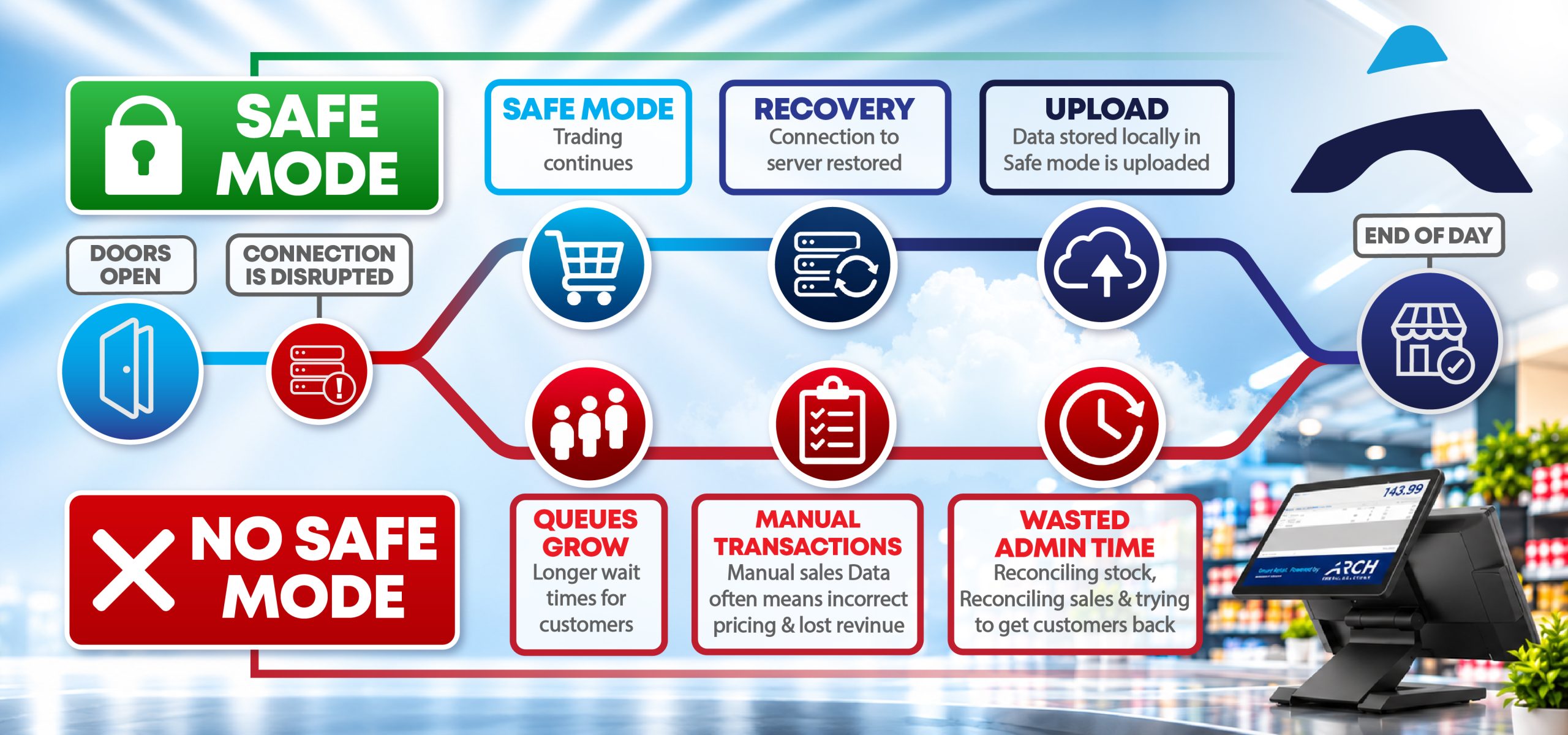
1. Server connection is lost
If a till loses communication with the server, it moves into Safe Mode and uses the information available in its local database.
2. The till continues processing sales
The cashier can continue serving customers while the technical team investigates the network or server issue.
3. Normal connectivity is restored
Once the connection is stable and the server is available, an authorised user can reconnect the till and return it to normal operation.
4. Safe Mode sales are returned to the server
The sales processed during the interruption will be returned to the server.
Why Safe Mode matters when choosing a retail system.
A retail POS system should do more than process sales when everything is working. It should also help your business continue operating when connectivity is disrupted.
For business owners, operations teams and IT managers, Safe Mode can support:
-
- Continued trading during certain network or server interruptions.
-
- Shorter queues and fewer abandoned purchases.
-
- Better customer experience during peak periods.
-
- Less pressure on store teams while technical issues are resolved.
-
- A more resilient retail operation across busy trading periods.
When comparing retail systems, ask what happens at the till when the connection to the server is lost. Can the till keep processing sales? How are those sales returned to the server afterwards? How is pricing and promotion applied?
The answers can directly affect your ability to protect revenue on your busiest days.
Preparation is essential before Black Friday
Safe Mode is most effective when tills, data and staff are prepared before a connection problem occurs. Getting your product, pricing and promotion information up to date begore peak trading begins is key.
Your pre-Black Friday Safe Mode Checklist
1. Finalise promotional pricing early
Prepare and distribute Black Friday and festive season pricing before peak trading starts. Price changes sent while a till is in Safe Mode only take effect once it returns to normal operation.
2. Complete outstanding Safe Mode updates
Confirm that all tills have received the latest product, pricing and promotion information before the busiest trading periods.
3. Check Safe Mode health
Before peak trading, confirm that the Safe Mode functionality on your tills has been checked and that required updates have been completed.
4. Confirm recovery responsibilities
Make sure the appropriate staff know what to do when a till enters Safe Mode and who has the required access to return it to normal operation.
5. Check the basics
Your recovery team should know how to check the POS's network connection and confirm that the store's main server is available before attempting to reconnect.
6. Run a pre-peak drill
Walk key staff through what happens when a till loses its connection and how normal operation is restored. A practice run is far better than learning the process while customers are waiting to pay.
Choose a reliable retail solution that helps you keep trading.
You cannot prevent every network or server problem. You can, however, choose a retail system designed to support continuity when communication is interrupted.
With Arch Retail Safe Mode correctly configured, updated and understood by your store team, a connectivity issue does not have to stop the till. On Black Friday, when every sale and every minute at the checkout counts, that matters.
Be ready before the retail rush.
Black Friday will not wait for a connection problem to be resolved. Prepare early, make sure your tills are ready and ensure your team knows what to do if connectivity is interrupted.